Developer Guide
- Table of Contents
Acknowledgements
- {list here sources of all reused/adapted ideas, code, documentation, and third-party libraries – include links to the original source as well}
Setting up, getting started
Refer to the guide Setting up and getting started.
Design
 Tip: The
 .puml files used to create diagrams are in this document docs/diagrams folder. Refer to the PlantUML Tutorial at se-edu/guides to learn how to create and edit diagrams.
Architecture
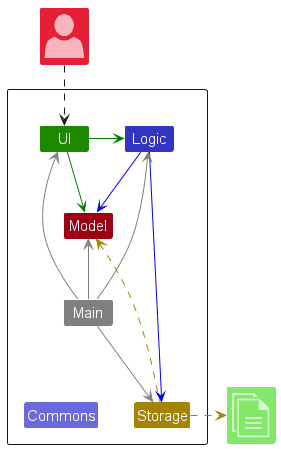
The Architecture Diagram given above explains the high-level design of the App.
Given below is a quick overview of main components and how they interact with each other.
Main components of the architecture
Main (consisting of classes Main and MainApp) is in charge of the app launch and shut down.
- At app launch, it initializes the other components in the correct sequence, and connects them up with each other.
- At shut down, it shuts down the other components and invokes cleanup methods where necessary.
The bulk of the app’s work is done by the following four components:
-
UI: The UI of the App. -
Logic: The command executor. -
Model: Holds the data of the App in memory. -
Storage: Reads data from, and writes data to, the hard disk.
Commons represents a collection of classes used by multiple other components.
How the architecture components interact with each other
The Sequence Diagram below shows how the components interact with each other for the scenario where the user issues the command delete 1.
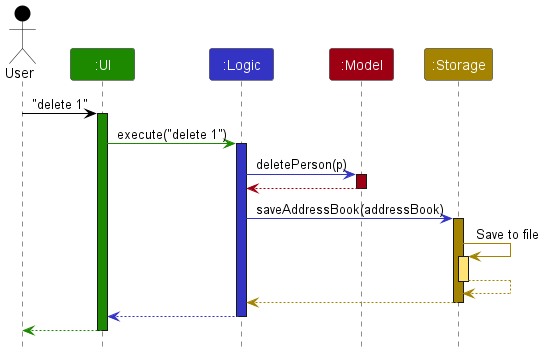
Each of the four main components (also shown in the diagram above),
- defines its API in an
interfacewith the same name as the Component. - implements its functionality using a concrete
{Component Name}Managerclass (which follows the corresponding APIinterfacementioned in the previous point.
For example, the Logic component defines its API in the Logic.java interface and implements its functionality using the LogicManager.java class which follows the Logic interface. Other components interact with a given component through its interface rather than the concrete class (reason: to prevent outside component’s being coupled to the implementation of a component), as illustrated in the (partial) class diagram below.
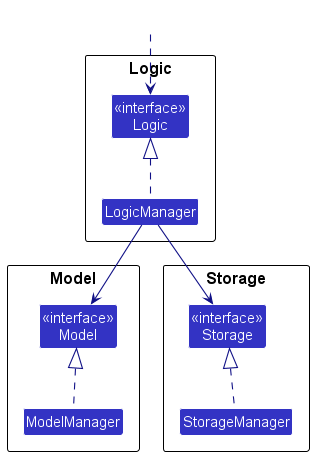
The sections below give more details of each component.
UI component
The API of this component is specified in Ui.java
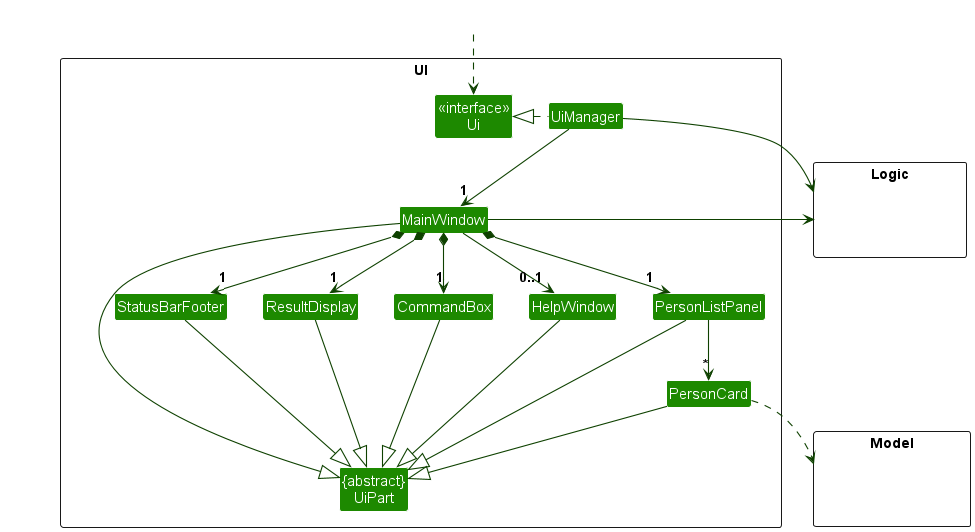
The UI consists of a MainWindow that is made up of parts e.g.CommandBox, ResultDisplay, PersonListPanel, StatusBarFooter etc. All these, including the MainWindow, inherit from the abstract UiPart class which captures the commonalities between classes that represent parts of the visible GUI.
The UI component uses the JavaFx UI framework. The layout of these UI parts are defined in matching .fxml files that are in the src/main/resources/view folder. For example, the layout of the MainWindow is specified in MainWindow.fxml
The UI component,
- executes user commands using the
Logiccomponent. - listens for changes to
Modeldata so that the UI can be updated with the modified data. - keeps a reference to the
Logiccomponent, because theUIrelies on theLogicto execute commands. - depends on some classes in the
Modelcomponent, as it displaysPersonobject residing in theModel.
Logic component
API : Logic.java
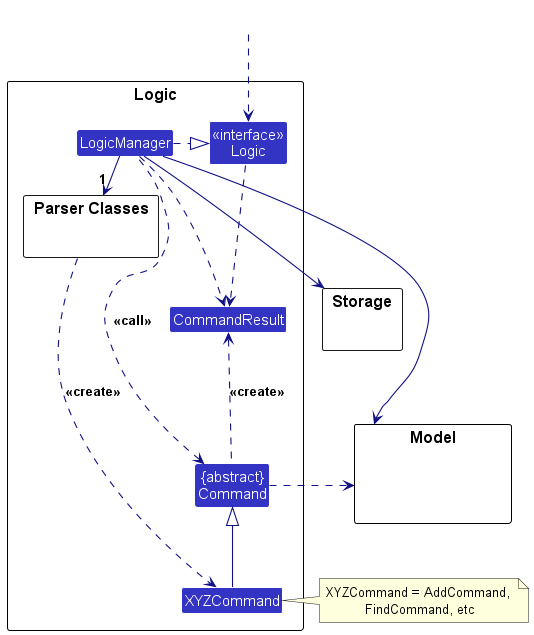
Here’s a (partial) class diagram of the Logic component:
The sequence diagram below illustrates the interactions within the Logic component, taking execute("delete 1") API call as an example.
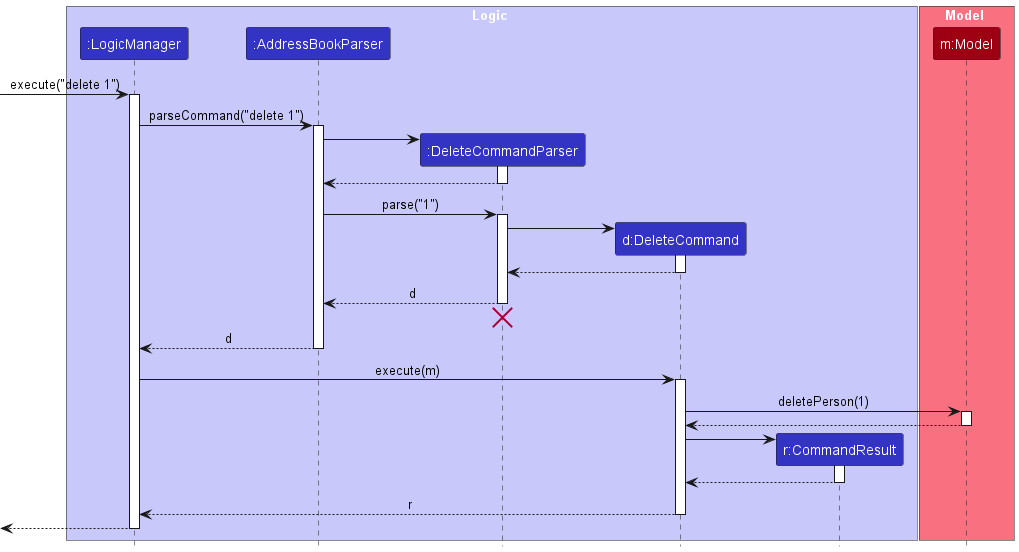
 Note: The lifeline for
 DeleteCommandParser should end at the destroy marker (X) but due to a limitation of PlantUML, the lifeline continues till the end of diagram.
How the Logic component works:
- When
Logicis called upon to execute a command, it is passed to anAddressBookParserobject which in turn creates a parser that matches the command (e.g.,DeleteCommandParser) and uses it to parse the command. - This results in a
Commandobject (more precisely, an object of one of its subclasses e.g.,DeleteCommand) which is executed by theLogicManager. - The command can communicate with the
Modelwhen it is executed (e.g. to delete a person).
Note that although this is shown as a single step in the diagram above (for simplicity), in the code it can take several interactions (between the command object and theModel) to achieve. - The result of the command execution is encapsulated as a
CommandResultobject which is returned back fromLogic.
Here are the other classes in Logic (omitted from the class diagram above) that are used for parsing a user command:
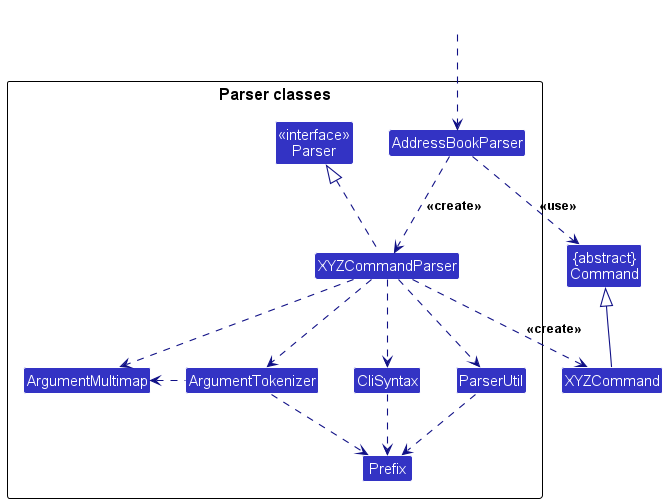
How the parsing works:
- When called upon to parse a user command, the
AddressBookParserclass creates anXYZCommandParser(XYZis a placeholder for the specific command name e.g.,AddCommandParser) which uses the other classes shown above to parse the user command and create aXYZCommandobject (e.g.,AddCommand) which theAddressBookParserreturns back as aCommandobject. - All
XYZCommandParserclasses (e.g.,AddCommandParser,DeleteCommandParser, …) inherit from theParserinterface so that they can be treated similarly where possible e.g, during testing.
Model component
API : Model.java
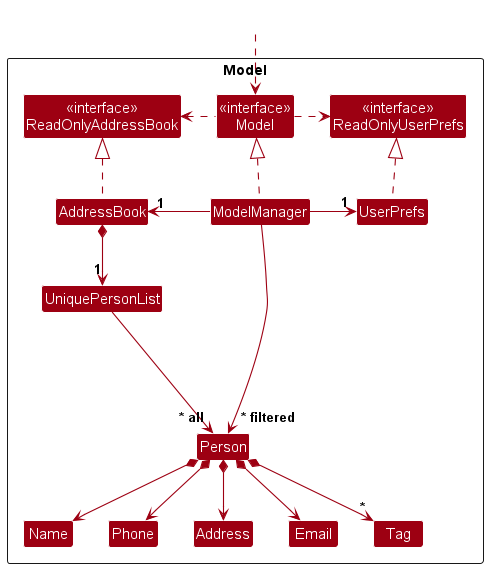
The Model component,
- stores the address book data i.e., all
Personobjects (which are contained in aUniquePersonListobject). - stores the currently ‘selected’
Personobjects (e.g., results of a search query) as a separate filtered list which is exposed to outsiders as an unmodifiableObservableList<Person>that can be ‘observed’ e.g. the UI can be bound to this list so that the UI automatically updates when the data in the list change. - stores a
UserPrefobject that represents the user’s preferences. This is exposed to the outside as aReadOnlyUserPrefobjects. - does not depend on any of the other three components (as the
Modelrepresents data entities of the domain, they should make sense on their own without depending on other components)
Note: An alternative (arguably, a more OOP) model is given below. It has a Tag list in the AddressBook, which Person references. This allows AddressBook to only require one Tag object per unique tag, instead of each Person needing their own Tag objects.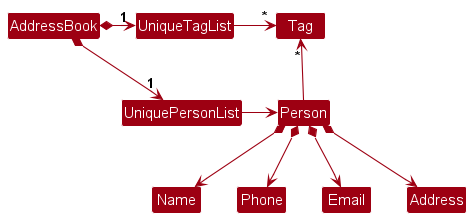
Storage component
API : Storage.java
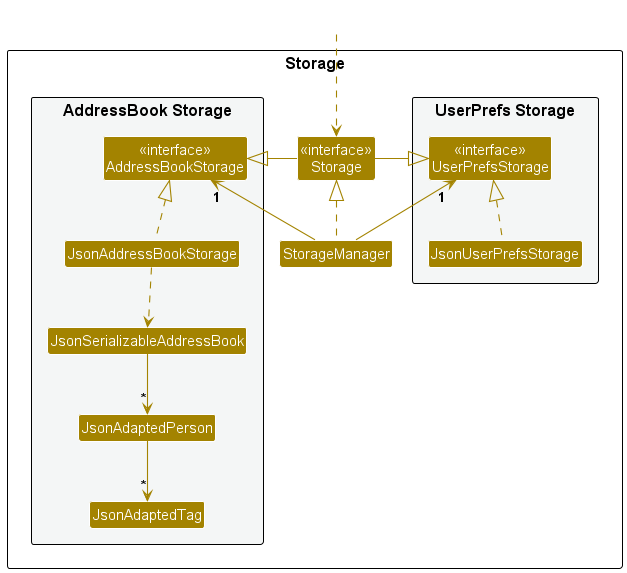
The Storage component,
- can save both address book data and user preference data in JSON format, and read them back into corresponding objects.
- inherits from both
AddressBookStorageandUserPrefStorage, which means it can be treated as either one (if only the functionality of only one is needed). - depends on some classes in the
Modelcomponent (because theStoragecomponent’s job is to save/retrieve objects that belong to theModel)
Common classes
Classes used by multiple components are in the seedu.address.commons package.
Implementation
This section describes some noteworthy details on how certain features are implemented.
Starred contacts feature
The starred contacts feature adds a starred boolean state to Person, with the following behavior:
-
star INDEXmarks the person at the displayed index as starred. -
unstar INDEXremoves the starred state from the person at the displayed index. - Repeating
staron an already-starred person (orunstaron an already-unstarred person) is handled as an informative no-op.
Model and ordering
-
Personstoresstarredas a data field (defaultfalse). -
Person#isSamePersonis unchanged (identity remains name-based). - Full object equality/hash semantics include
starred. -
AddressBookenforces starred-first ordering after person-list mutations. - Within the starred and unstarred groups, relative order is preserved.
Storage
-
JsonAdaptedPersonpersists thestarredfield. - Backward compatibility is preserved by treating missing
starredvalues in legacy JSON files asfalse.
UI
-
PersonCardrenders a subtle star marker for starred contacts. - The marker is hidden for unstarred contacts to keep the layout compact.
[Proposed] Undo/redo feature
Proposed Implementation
The proposed undo/redo mechanism is facilitated by VersionedAddressBook. It extends AddressBook with an undo/redo history, stored internally as an addressBookStateList and currentStatePointer. Additionally, it implements the following operations:
-
VersionedAddressBook#commit()— Saves the current address book state in its history. -
VersionedAddressBook#undo()— Restores the previous address book state from its history. -
VersionedAddressBook#redo()— Restores a previously undone address book state from its history.
These operations are exposed in the Model interface as Model#commitAddressBook(), Model#undoAddressBook() and Model#redoAddressBook() respectively.
Given below is an example usage scenario and how the undo/redo mechanism behaves at each step.
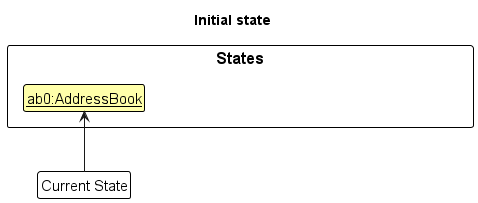
Step 1. The user launches the application for the first time. The VersionedAddressBook will be initialized with the initial address book state, and the currentStatePointer pointing to that single address book state.
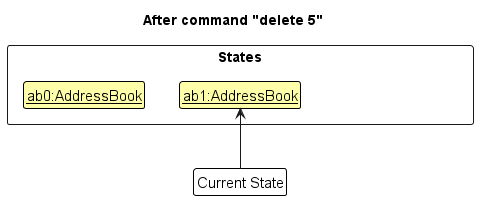
Step 2. The user executes delete 5 command to delete the 5th person in the address book. The delete command calls Model#commitAddressBook(), causing the modified state of the address book after the delete 5 command executes to be saved in the addressBookStateList, and the currentStatePointer is shifted to the newly inserted address book state.
Step 3. The user executes add n/David … to add a new person. The add command also calls Model#commitAddressBook(), causing another modified address book state to be saved into the addressBookStateList.
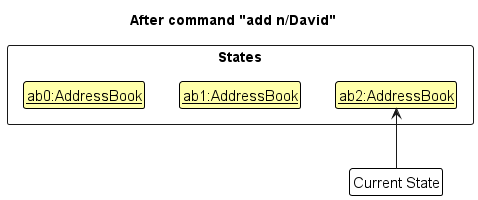
Note: If a command fails its execution, it will not call Model#commitAddressBook(), so the address book state will not be saved into the addressBookStateList.
Step 4. The user now decides that adding the person was a mistake, and decides to undo that action by executing the undo command. The undo command will call Model#undoAddressBook(), which will shift the currentStatePointer once to the left, pointing it to the previous address book state, and restores the address book to that state.
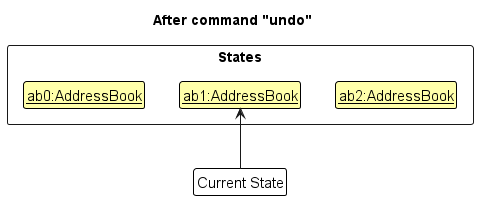
Note: If the currentStatePointer is at index 0, pointing to the initial AddressBook state, then there are no previous AddressBook states to restore. The undo command uses Model#canUndoAddressBook() to check if this is the case. If so, it will return an error to the user rather
than attempting to perform the undo.
The following sequence diagram shows how an undo operation goes through the Logic component:
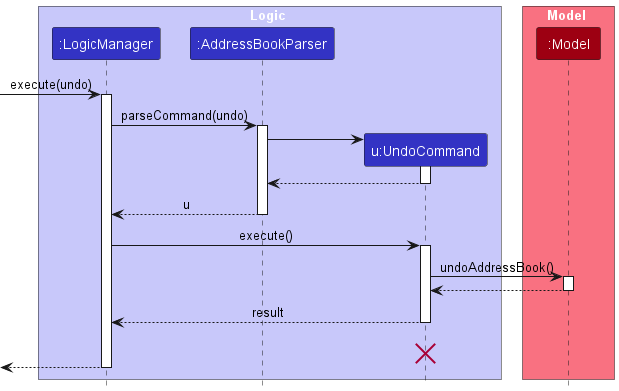
Note: The lifeline for UndoCommand should end at the destroy marker (X) but due to a limitation of PlantUML, the lifeline reaches the end of diagram.
Similarly, how an undo operation goes through the Model component is shown below:
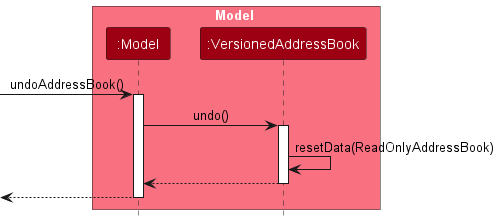
The redo command does the opposite — it calls Model#redoAddressBook(), which shifts the currentStatePointer once to the right, pointing to the previously undone state, and restores the address book to that state.
Note: If the currentStatePointer is at index addressBookStateList.size() - 1, pointing to the latest address book state, then there are no undone AddressBook states to restore. The redo command uses Model#canRedoAddressBook() to check if this is the case. If so, it will return an error to the user rather than attempting to perform the redo.
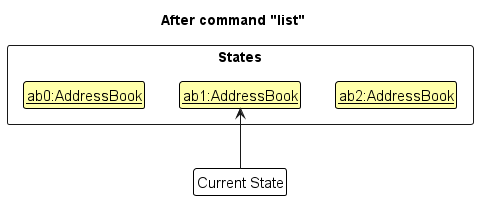
Step 5. The user then decides to execute the command list. Commands that do not modify the address book, such as list, will usually not call Model#commitAddressBook(), Model#undoAddressBook() or Model#redoAddressBook(). Thus, the addressBookStateList remains unchanged.
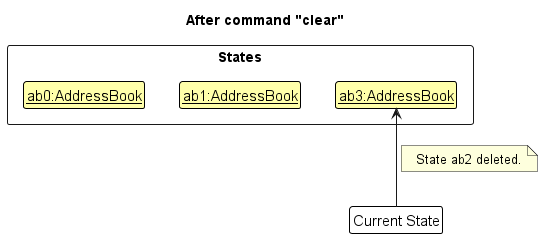
Step 6. The user executes clear, which calls Model#commitAddressBook(). Since the currentStatePointer is not pointing at the end of the addressBookStateList, all address book states after the currentStatePointer will be purged. Reason: It no longer makes sense to redo the add n/David … command. This is the behavior that most modern desktop applications follow.
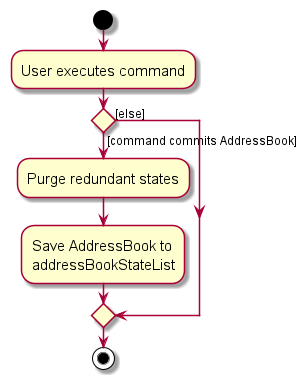
The following activity diagram summarizes what happens when a user executes a new command:
Design considerations:
Aspect: How undo & redo executes:
-
Alternative 1 (current choice): Saves the entire address book.
- Pros: Easy to implement.
- Cons: May have performance issues in terms of memory usage.
-
Alternative 2: Individual command knows how to undo/redo by
itself.
- Pros: Will use less memory (e.g. for
delete, just save the person being deleted). - Cons: We must ensure that the implementation of each individual command are correct.
- Pros: Will use less memory (e.g. for
{more aspects and alternatives to be added}
Data archiving
Implementation
The data archiving feature is implemented with an isArchived flag in Person.
-
archive INDEXmarks a contact as archived. -
unarchive INDEXrestores an archived contact to active status. -
listshows only active contacts. -
listarchivedshows only archived contacts.
The archive status is persisted in JSON storage through JsonAdaptedPerson using an archived property.
To preserve backward compatibility with existing save files, missing archived values are treated as false.
Command flow
-
AddressBookParserroutesarchiveandunarchiveto their dedicated parsers. - The parsers parse a one-based index using
ParserUtil.parseIndex. - The command resolves the target
PersonfromModel#getFilteredPersonList. - The command creates a new
Personcopy with the same fields except updatedisArchived. -
Model#setPersonreplaces the target person and refreshes the filtered list.
Filtering behavior
The app defaults to showing active contacts only.
-
Model.PREDICATE_SHOW_ACTIVE_PERSONSis used by default list views. -
findandfilterapply their predicates together with the active predicate. -
listarchivedusesPerson::isArchivedto show archived entries explicitly.
Design considerations
- Alternative considered: physically moving archived contacts into a separate list.
- Rejected because it would complicate storage and command behavior.
- Current approach: keep a single person list with an archive flag.
- Simpler migration path and minimal changes to existing command architecture.
Tests
Coverage includes:
-
ArchiveCommandTestandUnarchiveCommandTestfor command behavior. -
ArchiveCommandParserTestandUnarchiveCommandParserTestfor parser validation. -
AddressBookParserTestrouting coverage forarchive,unarchive, andlistarchived. -
JsonAdaptedPersonTestfor archive persistence and backward compatibility defaults. -
ModelManagerTestandPersonTestregression checks for archive filtering and object semantics.
Documentation, logging, testing, configuration, dev-ops
Appendix: Requirements
Product scope
Target user profile:
- An NUS CS student (or similar tech-savvy student) involved in multiple project teams, hackathons, and internships simultaneously
- Maintains a large and growing list of contacts such as teammates, tutors, professors, and friends
- Works primarily on a personal laptop
- Prefers CLI-based tools and keyboard-driven workflows
- Values speed, organisation, and minimal distraction
- Often overwhelmed by an unstructured contact list and struggles to retrieve specific contact details quickly
Value proposition: TaskNest helps users who manage many contacts across multiple commitments to store and organise contact information efficiently, search and retrieve contacts quickly via a fast CLI interface, and reduce clutter as their contact list grows — all faster than a typical mouse/GUI-driven app.
User stories
Priorities: High (must have) - * * *, Medium (should have) - * *, Low (nice to have) - *
| Priority | As a … | I want to … | So that I can… |
|---|---|---|---|
* * * |
new user | see usage instructions | refer to instructions when I forget how to use the app |
* * * |
user | add a new contact with a name, phone number, and email | store details of people I meet |
* * * |
user | delete a contact | remove obsolete or incorrectly entered entries |
* * * |
user | edit a contact’s details | keep information up to date when it changes |
* * * |
user | list all my contacts | see everyone I have stored at a glance |
* * * |
user | search for a contact by name | retrieve someone’s details quickly without scrolling through the entire list |
* * * |
user | receive validation feedback for an invalid email format | ensure my data is accurate and consistent |
* * * |
user | receive validation feedback for an invalid phone number | ensure my data is accurate and consistent |
* * * |
user | be asked to confirm before a contact is deleted | avoid accidentally losing important contact information |
* * |
user with a large contact list | filter contacts by tag | quickly find people associated with a particular group or project |
* * |
user | have my contacts sorted alphabetically by default | browse the list in a predictable, organised order |
* * |
user | be warned when I try to add a duplicate contact | avoid cluttering my list with repeated entries |
* * |
user | search contacts across all fields (name, phone, email, address, tags) | find someone even if I only remember a partial detail |
* |
user | undo a delete action | recover from accidental deletions |
* |
user | archive contacts I no longer actively use | keep the main list clean without permanently losing information |
* |
user | export my contact list | back up my data or share it with others |
* |
user | store multiple phone numbers or emails for one contact | accommodate contacts who have more than one reachable number or address |
* |
power user | use keyboard shortcuts for common actions | work even faster without breaking my typing rhythm |
Use cases
(For all use cases below, the System is TaskNest and the Actor is the user, unless specified otherwise)
Use case: UC01 — Add a new contact
MSS
- User enters the
addcommand with the required fields (name, phone, email) and any optional fields (address, tags). - TaskNest validates all provided fields.
- TaskNest checks that no duplicate contact (same name and phone) exists.
-
TaskNest adds the contact and displays a success message with the new contact’s details.
Use case ends.
Extensions
- 2a. One or more fields fail validation.
-
2a1. TaskNest shows the relevant error message for the first invalid field.
Use case resumes at step 1.
-
- 3a. A duplicate contact is detected.
-
3a1. TaskNest shows a duplicate contact error message.
Use case resumes at step 1.
-
Use case: UC02 — Find and edit a contact
MSS
- User enters the
findcommand with a keyword. - TaskNest displays all contacts whose name (or other fields) match the keyword.
- User identifies the index of the contact to edit from the filtered list.
- User enters the
editcommand with the contact’s index and the fields to update. - TaskNest validates the new field values.
-
TaskNest updates the contact and displays a success message showing the updated details.
Use case ends.
Extensions
- 2a. No contacts match the keyword.
-
2a1. TaskNest shows a message indicating no results were found.
Use case ends.
-
- 4a. The provided index is out of range.
-
4a1. TaskNest shows an invalid index error message.
Use case resumes at step 3.
-
- 4b. No fields are provided to the
editcommand.-
4b1. TaskNest shows an error asking the user to specify at least one field.
Use case resumes at step 4.
-
- 5a. A field value fails validation.
-
5a1. TaskNest shows the relevant error message.
Use case resumes at step 4.
-
- 5b. The edited contact would duplicate an existing contact.
-
5b1. TaskNest shows a duplicate contact error and rejects the edit.
Use case resumes at step 4.
-
Use case: UC03 — Find and delete a contact
MSS
- User enters the
findcommand with a keyword. - TaskNest displays all contacts matching the keyword.
- User identifies the index of the contact to delete from the filtered list.
- User enters the
deletecommand with the contact’s index. - TaskNest prompts the user to confirm the deletion.
- User confirms.
-
TaskNest removes the contact and displays a success message.
Use case ends.
Extensions
- 2a. No contacts match the keyword.
-
2a1. TaskNest shows a message indicating no results were found.
Use case ends.
-
- 3a. The provided index is out of range.
-
3a1. TaskNest shows an invalid index error message.
Use case resumes at step 3.
-
- 6a. User cancels the confirmation.
-
6a1. TaskNest cancels the deletion and shows a cancellation message.
Use case ends.
-
Use case: UC04 — List active contacts
MSS
- User enters the
listcommand. -
TaskNest displays only active (non-archived) contacts and a count of the total number shown.
Use case ends.
Extensions
- 2a. There are no active contacts.
-
2a1. TaskNest shows an empty list.
Use case ends.
-
Use case: UC05 — Archive and unarchive contacts
MSS
- User enters the
listcommand. - TaskNest displays active contacts.
- User enters
archive INDEXfor a contact in the list. - TaskNest marks the contact as archived and removes it from active views.
- User enters the
listarchivedcommand. - TaskNest displays archived contacts.
- User enters
unarchive INDEXfor a contact in the archived list. - TaskNest marks the contact as active again.
-
User enters
listand sees the contact in active contacts.Use case ends.
Extensions
- 3a.
INDEXis invalid.-
3a1. TaskNest shows an invalid index error.
Use case resumes at step 2.
-
- 3b. Contact is already archived.
-
3b1. TaskNest shows an already archived error.
Use case resumes at step 2.
-
- 7a.
INDEXis invalid.-
7a1. TaskNest shows an invalid index error.
Use case resumes at step 6.
-
- 7b. Contact is already active.
-
7b1. TaskNest shows an already active error.
Use case ends.
-
Non-Functional Requirements
-
Portability: Should work on any mainstream OS (Windows, Linux, macOS) with Java
17or above installed, without requiring any additional installation steps beyond downloading the JAR file. - Performance: Should be able to hold up to 1000 contacts without noticeable sluggishness for typical usage. All commands should produce a response within 2 seconds on a modern consumer laptop.
- Usability: A user with above-average typing speed for regular English text should be able to accomplish most tasks faster using CLI commands than using a mouse-driven GUI.
- Reliability: Contact data should be persisted to disk automatically after every command so that no data is lost upon a normal application exit.
- Data integrity: The application should reject all invalid or malformed inputs (e.g., incorrectly formatted phone numbers or emails) and display a clear, specific error message without modifying any stored data.
- Learnability: A new user who has basic familiarity with CLI tools should be able to complete core tasks (add, find, edit, delete) within 10 minutes of first launch, using only the built-in help command.
- Scalability: The contact storage format should remain backwards-compatible across minor version updates so that users do not lose data when upgrading the app.
- Single-user: The product is designed for use by a single user on one machine and does not need to support concurrent access or multi-user synchronisation.
Glossary
- CLI (Command-Line Interface): A text-based interface where the user types commands to interact with the application, as opposed to using a mouse and graphical elements.
- Contact: A person whose details (e.g., name, phone number, email address) are stored in TaskNest.
- Duplicate contact: Two contacts that share the same name (case-insensitive) and phone number, considered to represent the same person.
- Index: The position number displayed next to a contact in the currently visible list. Used to identify which contact a command should act on.
- Mainstream OS: Windows, Linux, Unix, macOS.
- MSS (Main Success Scenario): The sequence of steps in a use case that describes the most straightforward path to a successful outcome.
- MVP (Minimum Viable Product): The smallest set of features required to deliver core value to users. For TaskNest, this includes adding, deleting, editing, listing, and searching contacts with basic validation.
-
Tag: A short alphanumeric label that can be attached to a contact to group or categorise them (e.g.,
friend,work,project-alpha). - TaskNest: The name of this contact management application, built for tech-savvy students who manage many contacts across multiple commitments.
Appendix: Instructions for manual testing
Given below are instructions to test the app manually.
Note: These instructions only provide a starting point for testers to work on;
testers are expected to do more exploratory testing.
Launch and shutdown
- Initial launch
-
Download the jar file and copy into an empty folder
-
Double-click the jar file Expected: Shows the GUI with a set of sample contacts. The window size may not be optimum.
-
- Saving window preferences
-
Resize the window to an optimum size. Move the window to a different location. Close the window.
-
Re-launch the app by double-clicking the jar file.
Expected: The most recent window size and location is retained.
-
- { more test cases … }
Deleting a person
- Deleting a person while all persons are being shown
- Prerequisites: List active persons using the
listcommand. Multiple active persons in the list.
- Prerequisites: List active persons using the
Archiving and unarchiving a person
- Archiving a person from active contacts
- Prerequisites: Use
listto show active contacts with at least one person. - Test case:
archive 1
Expected: First listed person is archived. Success message shown. Person no longer appears inlist. - Test case:
archive 0
Expected: No person is archived. Error details shown.
- Prerequisites: Use
- Viewing archived persons
- Prerequisites: At least one archived contact exists.
- Test case:
listarchived
Expected: Only archived contacts are shown.
- Unarchiving a person
- Prerequisites: Use
listarchivedto show archived contacts with at least one person. - Test case:
unarchive 1
Expected: First archived contact is restored to active status. Success message shown. -
Test case:
unarchive 0
Expected: No person is unarchived. Error details shown. -
Test case:
delete 1
Expected: First contact is deleted from the list. Details of the deleted contact shown in the status message. Timestamp in the status bar is updated. -
Test case:
delete 0
Expected: No person is deleted. Error details shown in the status message. Status bar remains the same. - Other incorrect delete commands to try:
delete,delete x,...(where x is larger than the list size)
Expected: Similar to previous.
- Prerequisites: Use
- { more test cases … }
Saving data
- Dealing with missing/corrupted data files
- {explain how to simulate a missing/corrupted file, and the expected behavior}
- { more test cases … }